

Go to Windows platform Display platforms icon
Go to Windows platform Go to Mac platform Go to Android platform Go to iOS platform
SplitCam icon

SplitCam

10.9.2
4.9 7 reviews
645.6 k downloads
security security

Broadcast live to all types of platforms

Advertisement
Remove ads and more with Turbo
Advertisement
Remove ads and more with Turbo
Alberto García icon
Reviewed by
Alberto García
Developer’s Operations and Support
Alberto García is part of Uptodown's in-house Editorial Team. Translated by Uptodown Localization Team

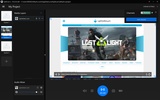
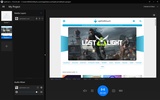
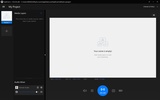
SplitCam is an app for broadcasting live content on streaming platforms. The app has a variety of customization options to make each stream unique. You can add many elements in the form of layers and make them overlap one another or force one of them always to put ahead of another.

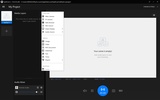
Among the dynamic elements you can introduce in each video broadcast are webcam, security camera, web browser view, network camera, or secondary screen. At the same time, you can also add various audio sources, such as the sound of a microphone, the sound of the system, or the sound of a specific app.

Advertisement
Remove ads and more with Turbo

It is also possible to add static elements, which are ideal for placing banners. You can choose between images, videos, PDF documents, slideshows, texts, timers, backgrounds, or playlists.

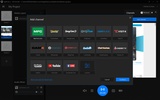
Available platforms in SplitCam and on which you can stream directly include Twitch, YouTube, Facebook Live, MyFreeCams, Chaturbate, BongaCams, OnlyFans, CamPlace, Visit-X, Cam4, Streamate, StripChat, CamSoda, ChatHostess, and Cherry.TV.

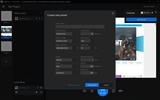
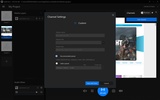
If the platform on which you want to broadcast is unavailable, you can add it manually as long as you have the URL and the stream key. In every case, you can create your own preset to broadcast content, i.e., you can choose the audio codec, video codec, resolution, frames per second, bit rate, and much more.

After adding the platform, you only have to click on start live. You can also take screenshots or save all the content to watch it later pre-recorded.

Therefore, if you want to broadcast live, SplitCam is one of the best free apps to do so.

SplitCam is for you if

✓ You desire highly customizable live streams with layered video, audio, and static overlay elements
✓ You want flexible streaming to major sites and custom platforms via manual RTMP configuration
✓ You value control over codecs, resolution, and recordings to optimize quality and repurpose content

Information about SplitCam 10.9.2

Basic information

Developer Splitcamsoft
Category Web Tools
Rating All ages
Languages English

Distribution model

Pricing Free
License Proprietary
Copyright © 2026 Splitcamsoft
Why is this app published on Uptodown? (More information)

Security and privacy

Required permissions Not applicable
See security and antivirus report

Download info

Downloads 645,606
Date Mar 20, 2026
File type MSI
Size 467.52 MB
SHA256 090618c3913178419ba2008ad04b4a9451f28ed58f81e4b44763b37336ac2dc3
Advertisement
Remove ads and more with Turbo

Older versions

See more
msi 10.8.70 Dec 15, 2025
msi 10.8.60 Aug 26, 2025
msi 10.8.55 Jul 28, 2025
msi 10.8.25 Jan 22, 2025
msi 10.8.5 Jul 15, 2024
msi 10.7.232 Feb 14, 2024
Available for other platforms

Rate this App

Review the app
SplitCam icon

Rating

4.9
5
4
3
2
1
7 reviews

Comments

See more
oldorangepine46998 icon
oldorangepine46998
in 2024

The best multistreaming software woth many exclusive features, i'm really recommend it to use!

1
Reply
limitada2009 icon
limitada2009
in 2023

I stream with this great software more than 2 years! I recommend it! It's really good!

1
Reply
massivepinklion39825 icon
massivepinklion39825
in 2020

Super software Free multistream !!

5
Reply
androdro icon
androdro
in 2020

Why does the image lag on a laptop and distort on a PC?

3
Reply
freshgreenlion46750 icon
freshgreenlion46750
in 2020

Excellent!

3
Reply
suliman2016 icon
suliman2016
in 2015

A great virtual camera program, I recommend using it.

19
1
See more
Advertisement
Remove ads and more with Turbo
Im4cam icon
im Intermedia
Uptodown App Store icon
Native Uptodown client for Windows 11
SpeedTop icon
A Fast,Lightweight, and Secure VPN Solution Built for Your Windows PC.
SHAREit icon
Share files between Android, Apple and a PC without Internet
Adobe Flash Player icon
Play flash animations in your browser
UltraSurf icon
Surf the Internet anonymously
UFO VPN icon
Surf as if you were in other countries for free
RoboForm icon
Fill in forms with just one click
Snap Camera icon
Add fun Snapchat filters to your PC camera
Iriun Webcam icon
Use your smartphone as a PC webcam
ManyCam icon
Take your live streams to the next level
Camo icon
Turn your phone into a professional camera for your PC
Windows Camera icon
The official Windows Camera App
Leawo Free Screen Recorder icon
4-in-1 free recorder to record screen, webcam, audio & screenshot
IP Camera Viewer icon
Manage all your security cameras from a single app
iVCam icon
Use your smartphone as a webcam
Google Chrome icon
Fast, clean and easy web browsing courtesy of Google
WhatsApp Desktop icon
The official WhatsApp app for Windows
Proton VPN icon
Powerful, free, secure and unlimited VPN
Opera icon
Robust, versatile and customizable browser
Snap Camera icon
Add fun Snapchat filters to your PC camera
Uptodown App Store icon
Native Uptodown client for Windows 11
Telegram Desktop icon
Talk to all your Telegram contacts from the desktop
SSuite NetSurfer Prometheus icon
The ultimate browser for modernized web surfing excellence!